Personal Learning about Context Engineering
Listen to this post
Road to 8,503,454 uncached token sessions
Since December, my token usage has been on an almost exponential rise every month. As I started using coding agents for more of my work, one thing became obvious: model quality matters, but context quality matters more. This post breaks down what actually ends up in context, how Codex structures it, and how I manage it with subagents and compaction.
Context is Key
Let’s start with an exercise. Think of all the information you have when you start working on code:
- Instructions from manager/mentor
- Discussion with colleagues
- Team direction/priority meeting
- Product feedback
- That blog which you want to implement in your codebase
- Similar patterns you have observed previously
Now how much context does the model have about your problem? NONE!!
A model has a lot of world knowledge compressed in its weights. However it has zero knowledge about your specific project. Everything it understands about your codebase is only what it has in its context window. Most people know this, but think about it for a moment and compare it against everything you just know at all times. In the current iteration of models, the usable context window is around 250k tokens. This means that for most codebases the model can never have the entire project in its context.
All this is to say that the model is as good as the context you provide it with.
What makes up the context?
Since context is so important, let’s dissect what information makes up the context window. I will extract this information from the codex codebase. It’s the harness that I use and like.
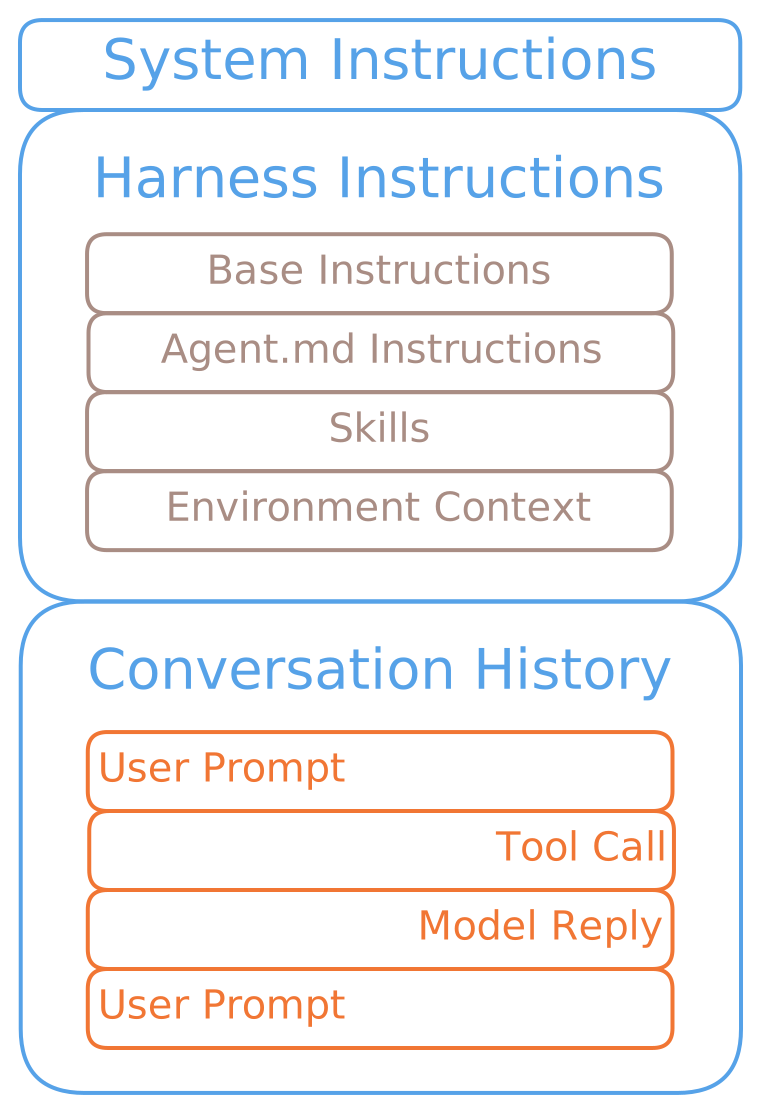
Hierarchy of Model Context
1. System Instructions
These are instructions injected into the prompt at the OpenAI servers. These are opaque to the users, though there have been many efforts to extract them. You can find a few such efforts on GitHub. The models have been trained to follow them with the highest priority.
Though these are mostly useless for our purpose and nothing to worry about.
2. Harness Instructions
This is all the information always injected into the context by the codex harness. You can expect that the models will adhere to them quite well.
Base Instructions
These tell the model that it’s running as a Codex coding agent. You can read it at prompt.md.
I can describe it here, but as an exercise, I would urge you to give it a read. It will help you understand what the harness expects of the model and in turn how it expects you 🫵 to use the model.
AGENTS.md Instructions
This file has been the source of much discussion lately and a lot of confusion around it. It’s defined and standardized at agents.md.
It is nothing more than a user defined file which is guaranteed to be injected in the context.
Since it has become a standard, the models have been trained to adhere to instructions and guidance provided in this file. From my experience, you should only include the most important information here. One very detrimental behavior I have noticed in people is to give too many instructions and context here. Remember, if everything is important, then nothing is important.
The easiest way to create a good AGENTS.md file is as follows:
- Don’t create AGENTS.md file. Let the agents run as is.
- If there is some behaviour that you find to be consistently different between your expectation and the model’s output, only then add it to AGENTS.md
For example, I don’t have a global AGENTS.md file. There are just two iterations I use most often.
Python Project
# AGENTS.md

## Python Execution

- Always use `uv` for Python commands in this repository.
- Use `uv run <file>.py` to run Python files.
- Use `uv run python -c <script_or_args>` when invoking Python directly with script arguments.
- Do not use `python` or `python3` directly.
Javascript Project
# AGENTS.md

- This project uses Bun
- Do not use npm
These are the two behaviours I have most consistently seen models miss. Therefore the instructions are:
- What to do
- What not to do, which it was doing earlier
Skill
This is a standard way to write docs for the model.
The format is defined at agentskills.io.
Like AGENTS.md, this is again a markdown file with instructions about specialized knowledge and workflows.
How these are added to context is varied based on usage.
By default the skills available in the repository are advertised to the model.
This means only the metadata containing the name and description of the skills is added to the context.
Now it’s up to the model to decide when to use the skill, which means when to read its associated SKILL.md.
However, the user can also force the injection of a specific skill by mentioning it using the format $skill-name.
The codex harness will resolve the name of the skill and its entire SKILL.md file will be injected into the context.
Environment Context
This is the rest of the stuff secondary to our discussion:
- Shell Name
- Current Date
- Allowed/Denied Network Domains
- Subagent List
- Tool Schemas
3. Conversation History
This is the conversation between you 🫵 and the model!
Now that we understand what makes up the context, let’s understand how to manage the context.
Use Subagents to Reduce Context
The first trick is to not let the context balloon by delegating small contained tasks to other agents.
Codex allows you to easily spawn new subagents which the main agent can manage. In my experience, the models do not proactively delegate much on their own, but explicitly asking them to spawn subagents works fine at level 1. However, I would still suggest explicitly explaining the model on how to delegate work to subagents for best results. This is when you will truly start to reach higher levels.
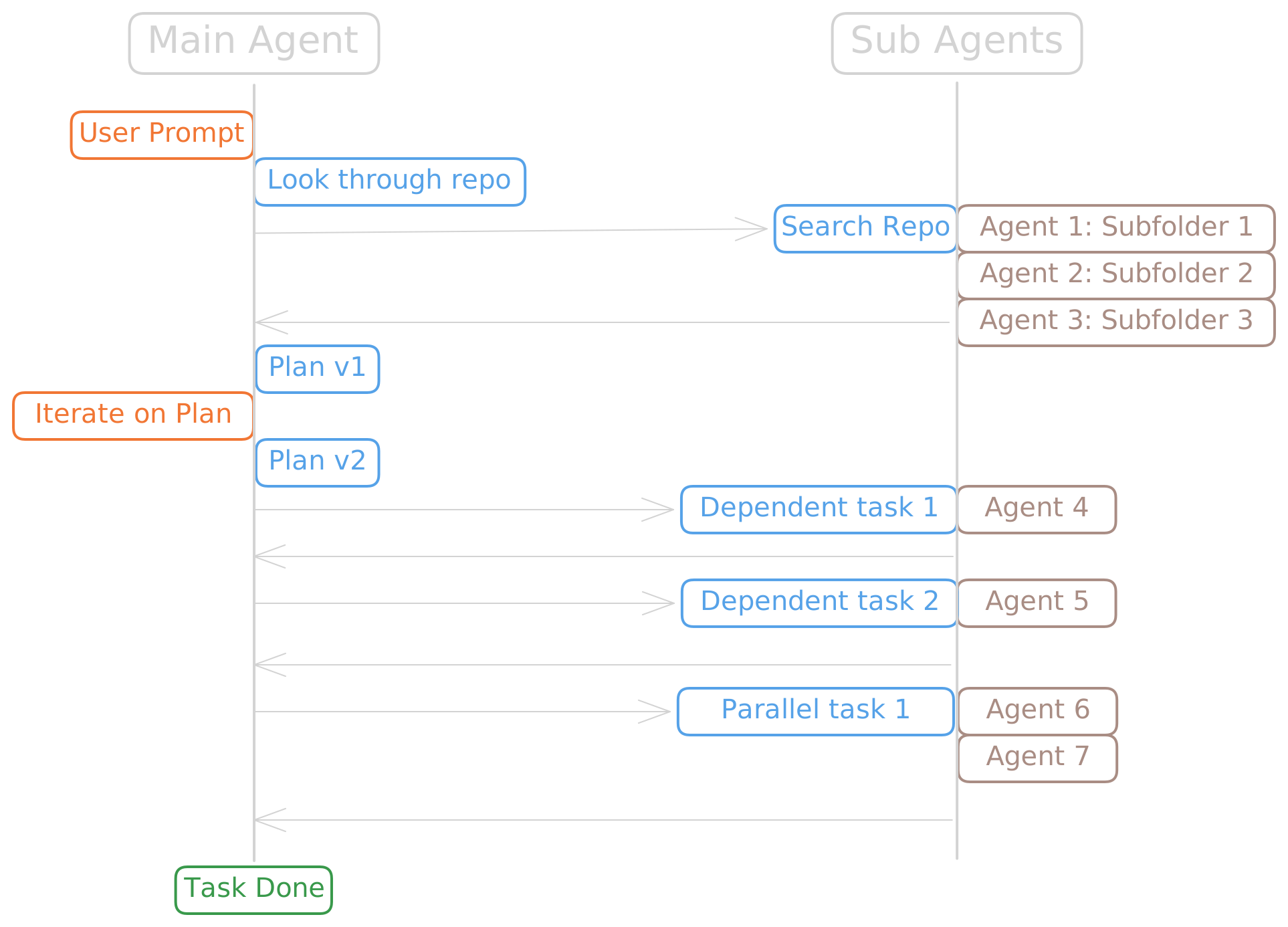
Communication between user, main agent and sub-agents
I have A/B-tested their ability to delegate work against mine. I have consistently found that user-explained task delegation works better in terms of context saved and quality of work. The trick is to keep the task narrow. If a subagent starts touching unnecessary files, the repo gets slopified quickly. A modular codebase has clear advantages here. Clear boundaries help the main agent understand the system and let subagents work in contained scopes.
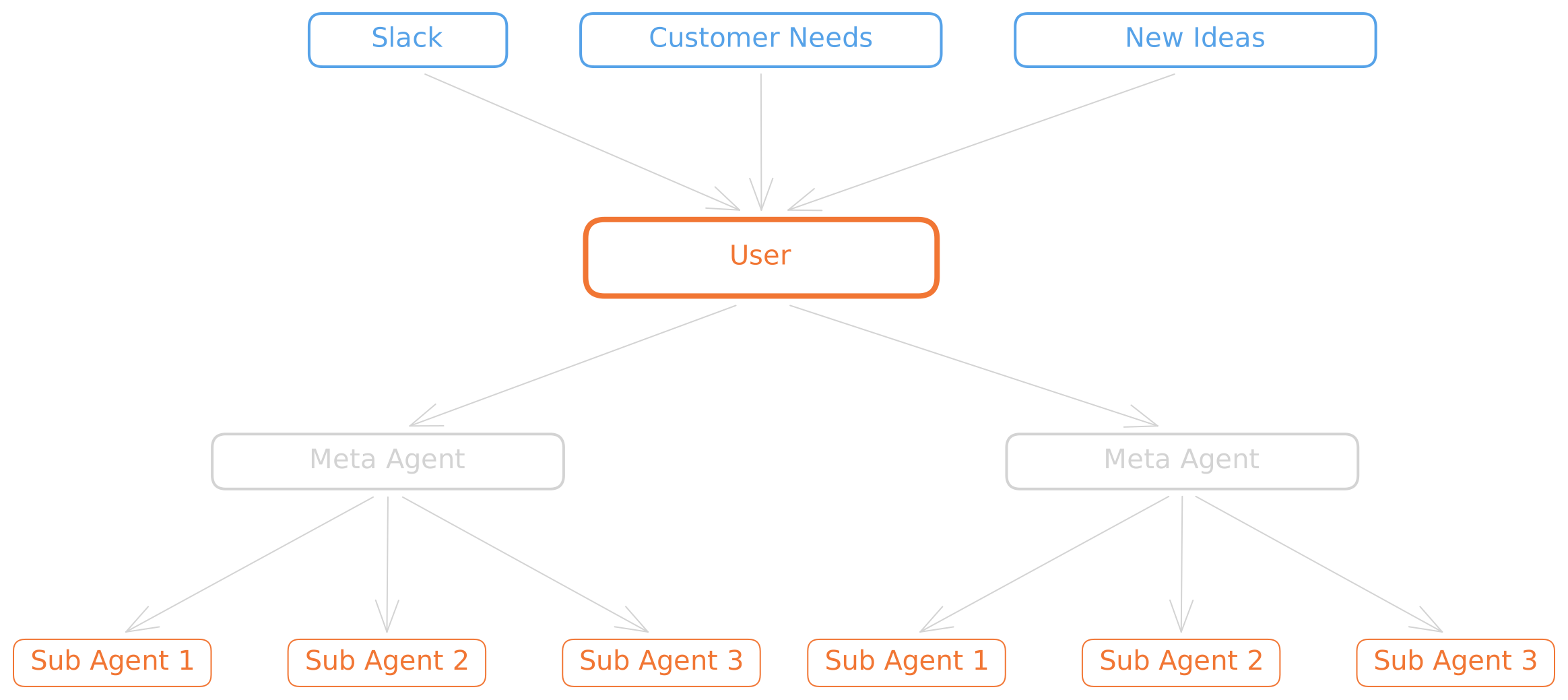
Hierarchy of context/intent
From my experience, one or at most two meta agents managing multiple subagents is the best workflow. Many people run many agents in parallel, but that gets unwieldy fast. It is more important than ever to minimise slop. My gut feeling is that limited context causes a lot of slop creep. The more the model has to infer, the more it drifts from the user’s intent. Better-scoped tasks reduce that drift.
Don’t Be Afraid of Compaction
We talked in length about how to minimise context usage, however it’s inevitable that you start to reach the limit of the model’s context window. When the session reaches the max context window of the session, Compaction takes place. Most people fear compaction and try to avoid it at all costs. But fear not my friends, once you understand what happens during Compaction, we can find ways to work around it.
How Compaction Works in Codex
There are 3 ways of triggering compaction:
- Automatic compaction when 90% of the context window is used while the turn is still going on.
- Automatic compaction when 90% of the context window is used and the turn is over.
- User requested compaction using the
/compactcommand.
In all three cases, the compaction method is similar at a high level, but not identical.

How compaction happens
- The System Instructions are opaque so we can just assume that they are reinserted.
- The Harness Instructions are stripped, recomputed, and inserted again next turn.
- The conversation history is sent to OpenAI’s compaction endpoint which returns a summary of the conversation. While going through the codebase, I also found an option for local summarization which is the fallback path for non-OpenAI providers.
Now we can map all the information that is possibly lost and not lost.
The Harness Instructions are recomputed and inserted again.
If any of these have changed during the session, the newly computed values are what get inserted.
In practice, stable things like base instructions or AGENTS.md files often come back looking the same, but they are regenerated rather than replayed verbatim.
One important caveat here is Skills. On recomputation, the model gets the advertised skill metadata again, but not the full skill body unless it is explicitly injected.
However, even if earlier you mentioned $skill-name and that injected the full SKILL.md, that full skill body is not automatically added again after compaction.
So if your workflow makes heavy use of skills, you may need to trigger that injection again.
The Conversation History is where the bulk of our context savings come from after compaction. This also means that some important information is lost; after all, summarisation is often lossy compression. There is one very simple trick to recover information after compression.
Just ask the model to recount what it understands and fill in the gaps.
It’s that easy! Whatever important context is lost, just fill that back in. Generally summarisation is not bad. The type of information that is lost is intent drift between you and the model. Therefore it’s your job as the orchestrator to align that back in.
Conclusion
Context engineering is not about stuffing as many tokens as possible into the window. It is about keeping the right information alive across the session.
Compaction is not the end of the session. It is just lossy compression. What usually degrades is not raw project knowledge, but alignment between your intent and the model’s working summary.
The fix is simple: ask the model to recount its understanding, then restate the goal, constraints, and anything important that was lost.